



Grow up with an upgrade to Galaxy.

MTN currently charges 5 kobo/kb for pay as you go browsing. Browsing on pay as you go is expensive for most users. So it is a good idea to migrate to an internet plan using its internet browsing codes as they offer more value for money.
MTN has cleaned up its internet browsing data plans making it easy to choose the one that is perfect for you. You now have just seven MTN Data Plan to choose from. There are cheap browsing plans for entry-level users and mobile phone browsing as well as browsing bundles for medium data and high data users.
MTN, like most other networks, offers daily data plans and weekly data plans in addition to the standard monthly subscription.
For information about MTN Data Plans in Nigeria, just dial *131# on your MTN line.
MTN Data Plan Prices
Below are the latest MTN Data Plan Prices:
- MTN Cheap Browsing for Mobile, 1GB (24/7 30 days) – N1000
- 1.5GB MTN mobile data plan (24/7 30 days) – 1200 Naira
- 2.5GB MTN mobile data plan (24/7 30 days) – 2000 Naira
- 5GB MTN mobile data plan (24/7 30 days) – 3500 Naira
- 10GB MTN data plan (24/7 30 days) – 5,000 NGN
- 22GB MTN data plan (24/7, 30 days) – N10,000
- 50GB MTN data plan (24/7, 60 days) – N20,000
- 85GB MTN data plan (24/7, 90 days) – N50,000
- MTN Daily data plan for mobile, 50MB (24 hours) – 100 Naira
- 500MB MTN Weekly data plan for mobile (24/7, 7 days) – 500 NGN
- MTN Daily data plan, 150MB (24 hours) – N200
Activation codes for MTN Data Subscription
Follow the instruction below to activate any MTN browsing bundle of your choice. You will also see the code for checking your MTN data subscription balance.
- MTN Cheap Browsing Plan for Mobile, 1GB (24/7 30 days) – text 106 to 131 – 1000 NGN
- 1.5GB MTN data plan (24/7 30 days) – text 130 to 131 – 1200 NGN
- MTN 2.5GB mobile data plan (24/7 30 days) – text 110 to 131 – 2000 NGN
- 5GB MTN data plan (24/7 30 days) – text 107 to 131 – 3500 Naira
- 10GB MTN data plan (24/7 30 days) – text 116 to 131 – 5000 Naira
- 22GB MTN data plan (24/7 30 days) – text 117 to 131 – 10000 Naira
- 50GB MTN data plan (24/7 60 days) – text 118 to 131 – 20000 NGN
- 85GB MTN data plan (24/7 90 days) – text 133 to 131 – 50000 NGN
- MTN Daily data plan for mobile, 100MB (24 hours) – SMS 104 to 131 – N100
- 750MB Weekly browsing for mobile, 500MB – text 103 to 131 – N500
- MTN Daily data plan, 150MB – text 113 to 131 – N200
To check your MTN browsing data balance, SMS 2 to 131.

A 74-year-old man ranting about a broken phone drove his car through the glass storefront of a Verizon Wireless store in North Carolina, authorities said Friday, stunning shoppers during the dinner hour at an upscale mall.
Charles Michael Hager was charged with assault with a deadly weapon and damaging property after he drove into the store at a busy shopping center in Raleigh Thursday night, according to a police statement, per the AP.
A witness told a 911 operator that he saw Hager standing outside the store located between two popular restaurants, demanding that it reopen to help him with his broken phone.

"He was demanding to get his phone fixed," the unidentified caller said, later adding:
"He said: 'My damn phone's not working. I need help. Open this damn door."
A police news release said Hager first kicked the door, shattering glass, then drove his car through the storefront. Six employees were in the store, but no one was injured. The caller said a crowd of bewildered onlookers gathered around as the man got out of his car wearing a gray collared shirt and gray slacks and continued to yell.
The scene unfolded at North Hills Mall, an outdoor shopping center surrounded by pricey homes and several high-rise office buildings north of downtown.


From the remarkable launch of a revolutionary smartphone, to embarking on a tour that showcased the beautiful sights of Nigeria and finally a partnership with Genesis Deluxe Cinemas to exclusively screen the highly anticipated Marvel Studio's Avengers: Infinity Wars- the new TECNO Camon X-series sure had an amazing grand entry into the Nigerian market.
As the Camon X series enjoyed an astonishing ride in the first month of its release, it also trended across several social media platforms, let’s relive the moments together.
It all started with a Global Spring Launch……
A true definition of glitz and glamour would be the global spring launch held at the prestigious Eko Hotel and Suites, Lagos to unveil the CAMON X series by Africa’s number one smartphone marker, TECNO Mobile. Taunted by many attendees as one of the most organized and stylish events to have graced the nation’s ‘city of excellence’ in 2018, the new CAMON X was launched with its duo, the CAMON X PRO, both flaunting revolutionary camera advancements- 20MP+ 16MP and 24MP+16MP front and rear cameras respectively. With other impressive features, the Camon X series were the toast of the smartphone market.
#CLEARSELFIE: CAMON X meets students!
TECNO teams visited campuses and as usual TECNO Mobile had something special for the students. Several selfie zones where created in each of the universities visited and students who visited the zones were given an amazing treat, but this was after they had enjoyed taking several images at the different selfie zones. For the students who wanted to get new devices, the new TECNO Camon X were made readily available for sale and buyers of the devices were given instant incentives.
Let’s tell a story through CAMON X lens
The next item on the fun list for experiencing the wonders the CAMON X-series can do was a tour round the blissful cities of Owerri, Calabar, Kaduna, Abuja, Ibadan and Lagos, capturing attractive day and buzzing nightlife pictures. Stunning images of the tour were shared on various social media platforms to the delight of TECNO fans, tech lovers and photography enthusiasts.
The team members who participated in the tour couldn’t seem to stop talking about their amazing experiences and the warm reception they got from all the cities they visited. The CAMON X #SelfieTour opened people’s eyes to how culturally rich Nigeria is.
Selfie King and Queen
And, let’s not forget the #ClearSelfieContest. The contest could only be described by both the participants and judges in this 9 letter words “WONDERFUL”. The contest which saw the emergence of Osho Ayodele James and Tolu Adebola-Stephen as the Camon X selfie King and Queen, had participants expressing astonishment at the clarity of the images taken with the Camon X compared to those of other devices.
And…to the INFINITY WAR they went…
The red-carpet event saw the TECNO CAMON X team on ground to enjoy an exclusive screening of the blockbuster movie Avengers: Infinity War. From the red carpet hosted by celebrity presenter Shine to the screening room, the star-studded event which held at The Palms Cinema, Lekki had guests, cinema goers and Marvel fans reeling in excitement at the cinematic moments that were created.
All these amazing moments and much more were captured with the flawlessly beautiful camera of the Camon X-series


Airtel is the country's largest mobile service provider, which is competing against the newbie Reliance Jio to make sure it maintains its dominance in the Indian telco market. Following the rise of JioPhone, Airtel started "Mera Pehla Smartphone" initiative to convince customers to upgrade their 2G and 3G phones to low-cost 4G smartphones with attractive bundle offers.
Now, Airtel is making its "Mera Pehla Smartphone" initiative further appealing by giving away 30GB free data just by switching to a 4G smartphone. The offer is applicable to both prepaid and postpaid customers.
"While 4G smartphones are fast becoming the norm for millions of customers with feature phones/ 3G devices the upgrade to a 4G smartphone is a big decision and a long-term investment. This is one of the largest customer rewarding programs & with this initiative, our customers shall get an opportunity to experience the online world at 4G speeds and fully unlock the potential of their smartphones. We believe this will help millions of our customers to fulfill their aspiration of owning a 4G smartphone by making the transition more rewarding," Vani Venkatesh, CMO, Bharti Airtel, said in a statement.

How to avail 30GB free data on new 4G phones?
First-time 4G smartphone users on Airtel's network can avail the offer after confirming eligibility. Users can do so by calling 51111 toll-free number from their registered mobile number, go to the official company website or check through My Airtel app.
Eligible customers will get the free data within 24 hours of activation. But the offer comes with certain conditions, such as the customer should be on Airtel network for more than 90 days and be on a 2G/3G handset for more than 74 days out of the last 90 days.
Airtel prepaid customers will get 1GB free data per day on top of their current plan and postpaid customers will get 30GB data added to their account with data rollover benefit.
Airtel's "Mera Pehla Smartphone" initiative includes several smartphone brands under its umbrella, like Samsung, Intex, Karbonn, Lava, Celkon, Motorola, Lenovo, and Nokia. Customers buying select smartphone models from these brands can avail cashbacks and special bundled plans to lower the effective cost of the device.

It is no more news that there seems to be little limits to the functionality of smartphones these days. Smartphones like the Tecno W3 leaves no excuse for overspending as the phone can easily assist in prioritizing your budget right from the time you purchase it. Colossus Gists in partnership with Jumia Nigeria, the online shop you can trust shares 5 cool ways your smartphone can save you money.
1. Compare prices before you go on a shopping spree
The smartphone's ability to check and compare prices is one of the best ways your phone can help you to save money. Before going to your favourite shopping mall to buy anything, you'll need to consult a few apps like the Jumia One app to help you compare prices before you decide which one to go for.
2. Use apps to save time and money when banking
Your smartphone can also save you time and money. With apps, you can find your bank's nearest ATM when you need to withdraw cash and with this, you can avoid ATM fees.
Also, instead of wasting time and spending money to go to the nearest ATM, you can download your bank's app to do all your banking transactions.
3. Make calls without exhausting your credit
With an unlimited wi-fi connection, you can start making Voice Over Internet Protocol, VOIP calls and save yourself the financial burden of buying recharge cards every time. You can go about making your calls by using your mobile Whatsapp, Skype and BBM applications on your smartphone for calls. Don’t believe? Try it for a week and see the wonders it does to your pocket.
4. Discounts on the mobile apps
Just because a lot of us access most websites via the app, a lot of organizations tend to give exclusive discounts on their mobile apps. Take for example, the just concluded Jumia Mobile Week where the Samsung S8 was sold at N1,850 only on the app.
5. Cabs
Cab services went smart over a decade back, and most services have their own apps to make bookings a cakewalk. With the advent of services like Uber and Taxify, however, the whole game changed. These apps bypass the conventional hailing model to create a marketplace of drivers waiting to offer rides. The unending slew of similar on-demand service apps that followed gave rise to cut-throat competition, even lower prices and excellent customer service all benefiting the end customer.

Xiaomi has officially unveiled four of its latest smartphone devices - Redmi Note 5a, Redmi Note 5a Prime, Redmi 5 and Redmi 5 plus in Nigeria and exclusively on Jumia Nigeria website on March 7th, 2018. The two smartphones, which run on Android 7.0 (Nougat) with an incredible battery life of 3080mAh, are essentially an upgrade of the Redmi Note 5.
Juliet Anammah, CEO of Jumia Nigeria disclosed this saying,
“I am confident that Xiaomi’s success in other markets will be replicated in Nigeria - as it was in India and Indonesia - as a result of the depth of their understanding of exactly what the Nigerian customers need as regards the functionality and durability of a smartphone.

Jumia is proud to bring these two new devices to the Nigerian market and will officially be available for purchase during our Mobile Week sales event scheduled to hold March 15th through 25th, 2018. We’re very happy to be the exclusive online distributor of these new smartphones in Nigeria.”
One remarkable attribute of both phones is their picture quality: the Redmi 5a Prime boasts of a 16MP front camera, with f/2.0 aperture on the front as well as a flashlight, while the primary camera for both phones on the rear packs a 13-megapixel camera.

All the devices feature a 5.5’HD screen with a resolution of 720 pixels by 1280 pixels and have a super slim 8.4mm thickness and an appealing unibody metal chassis that gives it a wonderful aesthetic look. They are powered by an Octa-core Qualcomm 435 and use a dual nano sim slot.

The Redmi 5a Prime has a hybrid 32GB ROM and a 3GB RAM while its counterpart, the Redmi 5a houses 16GB ROM and 2GB RAM.
The most notorious feature is undoubtedly the device’s high-spec camera, which allows its users to capture precious moments and fleeting sceneries with ease. A growing trend in the world of tech and fashion that will definitely leave its mark and become a reference for future devices.

Smartphones are very useful and we can barely do without it. They perform many functions and make our lives simpler. However, these devices or gadgets can cause a lot of pain and frustration when their batteries begin to decline. It is always a good idea to watch out for these signs of a bad battery if you really want to enjoy your smartphone.
Colossus Gists lists out some of these signs.
a. Phone restarts on its own
This is one of the common complaints of many smartphone users. You could be performing an important task when your smartphone suddenly decides to restart. If this is happening frequently, check your battery for damage.
b. Battery drains easily
Batteries perform at its best in the first 2 years. But once the first 2 years are up, they start declining. If your battery doesn’t seem to power your phone for long, it’s likely a sign that its time to replace it.
c. Phone does not charge after being plugged in
This is another common sign of a bad battery. If the phone doesn’t charge after being plugged in, there’s probably an issue with the battery. Here, the phone stays dead even after repeated attempts at charging it.
d. The phone doesn’t hold its charge
If the battery has started to deteriorate, the device won’t stay on for long. It will power up when you connect it to a power source but it won’t hold its charge. When this happens, you know it’s time to replace the battery.
e. Overheated battery
Excess heat generation often happens when you plug in your phone for charging. If you feel your device is getting too hot, it may be because of your battery.
f. The battery bulges
Sometimes, when a battery goes bad, the internal cells rupture and cause a bulge to appear in the battery. Batteries bulge when they undergo undesirable chemical reactions. If you do not want your battery bulging, make sure you prevent it from overheating.

Africa’s mobile internet connections will rise from 419 million at the end of 2017 to 1.07 billion by the end of 2022.
A report by research and consulting firm Ovum in London estimates that mobile broadband connections “Data connectivity is growing strongly in Africa.
The foirm said there are also good prospects on the continent in areas such as digital media, mobile financial services, and the Internet of Things,” said Matthew Reed, Practice Leader Middle East and Africa at Ovum.
“As Africa’s TMT market becomes more convergent and complex, service providers are under increasing pressure to make the transition from being providers of communications services, and to become providers of digital services.”
Mobile phone operators such as MTN Group, Orange and Bharti Airtel are investing heavily in high-speed networks to meet demand from users who are increasingly using phones for everything from paying their bills to streaming videos and surfing the internet.
Source
NAN

No holding back for Samsung as their new social media ad campaign throws Everest-sized shade at a fellow smartphone maker Apple.
Beginning with the launch of the iPhone in 2007, Samsung chronicles its growth in relation to the Samsung Galaxy S series, with a caption that says: “Grow up with an upgrade to Galaxy.”
What’s most exciting is the anticipation of how exactly Apple will respond to this (surely, they won’t do nothing).
And, of course, it’d be interesting to see other smartphone companies wade in (please, Google. Anything will do).
Watch the ad below:

There are moments where you need your and it stubbornly refuses to power on. The instant reaction of many people is that of fear, worry and concern. This expected reaction is because many of us cannot do without our phones.
There are so many reasons why your phone may not come on. Before you take it to an engineer in your desperation, kindly follow these due process to know if you can fix it personally
Charge your phone
In case your phone's battery is dead, your phone might show empty battery when you try to turn it on. However, if the battery is completely dead, your smartphone will not respond at all when you press the power button. A quick charge of your phone for few minutes should solve the problem.
Remove the battery
Your phone can hard freeze and refuse to respond. If the device is completely frozen, your device may be powered and running but the device refuses to start as the OS is frozen and fails to respond when the power button is pressed. In this case, you can do a hard reset to fix it. This will make the device to reboot.
Hard reset
If the phone battery is not removable, you need to long-press the power button. This is regarded as a hard reset. Hard resetting your phone battery means that you need to hold the button for 30 seconds or longer. Your phone should perform optimally after this.
Restore factory setting
While sometimes, your phone might begin booting, but the Operating System is crashing or freezing. You can reboot your device to the recovery mode and do a factory reset. The best way to boot up the device is to use recovery mode to do a factory reset. Power down your phone and boot it by holding several buttons at the same time. The buttons that your press will depend on your phone. This will override all your settings and restore your phone to the mode it came from the factory.
--------------------------
Adeniyi OGUNFOWOKE
PR Associate @ Jumia Travel
phone: +2348090747241 | skype: Sleeksavvy

Xiaomi's bezel-less Mi Mix smartphone grabbed a huge amount of attention when it launched last October. Now the Chinese phone maker is getting more opportunistic with the follow-up version, which it plans to unveil at an event in Beijing one day before Apple's iPhone launch.
The timing is perfect for Xiaomi. Its last device was a smash and there's huge expectations on the next iPhone.
All eyes will be on Apple, which needs to release a device that distinguishes itself from the past few tick-tock iterations to boost its brand and shore up falling sales in China. From what we've seen so far from leaks, it appears that the next iPhone will include some radical changes, but in launching a day prior, Xiaomi will take the spotlight for 24 hours and lay the ground for direction comparisons with Apple's next flagship.
The Mi Mix was a hit beyond Xiaomi's usual pool of fans thanks to a stunning front design which is nearly all screen and very little bezel.

The original Mi Mix was unveiled in October 2016
At the time that was a serious breakthrough -- Xiaomi initially billed the Mi Mix as a concept device -- but now screens are the hot topic for smartphones in 2017. LG and Samsung have unveiled devices with minimal bezels, running with the Mi Mix's design lead, so naturally there's plenty of anticipation over what Xiaomi has up its sleeve for the follow-up model.
Early leaks suggest an even smaller bezel -- well of course! -- with Qualcomm as-yet-announced Snapdragon 836 chipset and support for Android 8.0 Oreo off the bat.
Xiaomi isn't saying too much for now... because why spoil the event when you've set it up so nicely.
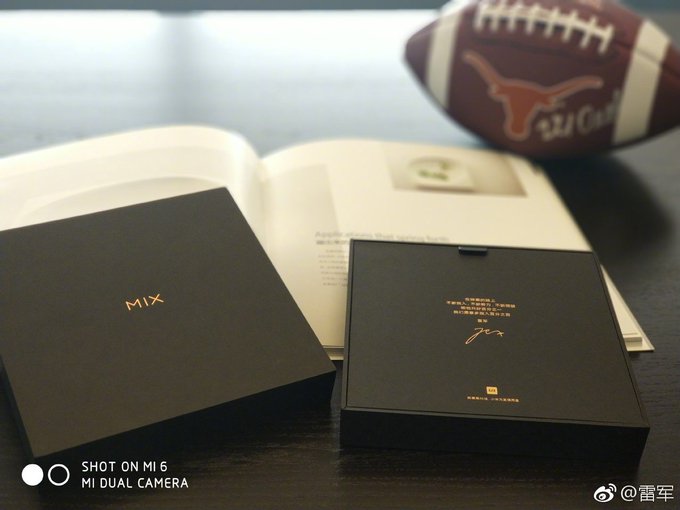


2017 has been a much better year for Xiaomi after it had struggled to maintain heady growth of its early days over the last two years.
CEO Lei Jun admitted that Xiaomi had grown too fast when looking at its 2016 results, but this year it seems to have found its rhythm with impressive sales growth and a recent $1 billion loan to put the focus back on its international growth, which had stalled in recent times with little sign of success outside of China.
In that respect, the Mi Mix launch timing is ideal for Xiaomi. Now we wait until September 11 to see what comes next.

A major problem that many top phone manufacturers are encountering is the cloning of their brands. This trend continues despite the painstaking efforts to make cloning difficult.
Despite this, the counterfeiters are having a field day faking these brands and it has made it hard for users to differentiate between counterfeit and original phones. Jumia Travel, the leading online travel agency, through Colossus Gists, shares tips for identifying a fake device.
Packaging
Manufacturers of counterfeit products are sometimes careless with packaging. Phone makers will always take care of the smallest details of design and packaging of their own goods. So, take a close look at the package, paying attention to the print quality ensuring consistency. In addition, ensure nothing should be loose inside.
Look at the wires and plugs
The quality of the wire is an important sign of a counterfeit product. If it is original, a plugged-in cable will sit firmly and evenly, while in a fake, you will see loose parts.
Check the user manual
The user manual is one of the easiest ways to identify a fake gadget. Every relevant information about the device must be there in the language of the country of purchase. If it’s written in some other language and you cannot read it, then it is a cloned brand.
Look at the fonts
All fonts and symbols on the gadgets must be similar, readable and regular. If this is not the case, it means the phone is fake or counterfeit.
Pay attention to the material
The material used for making a phone can either be high or low-quality. Popular brands don’t cut back on materials. The plastic covering the phone must be smooth, without any creases.

Screenshots are important for different purposes. It can be used to capture screenshots of whatever is on your laptop. So, if you use Windows 10, you may be unaware of how to screenshot because it is relatively new. As such, we showcase 5 ways you can screenshot anything particularly if you are using Windows 10.
Below are 6 ways to take screenshots in Windows 10.
1. Snipping Tool
Snipping tool is Windows’ built-in screenshot tool. This option comes with every Windows Operated laptop. Finding Snipping Tool in Windows 10 is not difficult. Simply search for snipping tool in the search panel. Select the Snipping Tool app. As the Snipping Tool opens, click New to capture a new screenshot.
2. Windows + Shift + S
Use windows + Shift + S to capture a region of your screen and copy it to your clipboard. After you press Windows + Shift + S, the screen is dimmed, and a cursor is shown, that you can use to draw on the screen the region that you want to capture in a screenshot. Draw the area that you want to capture and release the mouse cursor.
3. Print Screen
Tap on the Prtsc button on your keyboard. Pressing the button captures the whole screen. Now open an image editor like Paint. Press Ctrl+V to paste the content. Save the image after cropping.
4. Windows Key + Print Screen
This option captures your screenshot and automatically saves them. To capture your entire screen and automatically save the screenshot, tap the Windows Key + PrtScn. The screen will dim for a second to let you know that the screenshot has been captured. Now find the saved snapshots in the following location Pictures > Screenshots folder.
5. Windows Key + H
If you would like to capture your entire screen for sharing purposes, you can use the Windows Key + H keyboard shortcut. This will capture your entire screen.
6. Alt + Print Screen
To take a quick screenshot of the active window, use the keyboard shortcut Alt + PrtScn. This will snap your currently active window and copy the screenshot to the clipboard. You will need to open the shot in an image editor to save it.

Your smartphone dropping in water doesn’t mean the end of it. Although smartphones are not waterproofed, you can still rescue it. The most important thing is that you should apply these tips shared by Jumia Travel, the leading online booking agency to save your phone. It is no gainsaying that water and phones are enemies.
Mr. Water is always happy to destroy your phone.
a. Don’t press anything after taking it out of water
The first thing you should do is to remove your smartphone from the water. You know right? Importantly, don’t do anything like turning it on, press any keys, nor blow it. You should not do any of this if you are serious about saving your phone.
b. Open the back and remove the battery
The next thing you should do immediately you remove your phone from water is to carefully remove the battery.
c. Take out other removable parts
For those whose batteries are not detachable from their phones, they should simply remove their SIM cards and memory cards. You should also do same even if you can detach your battery.
d. Dry your phone
There are different ways to dry your phone. The first one that comes to mind is the sun. But there are other ways. You can use a vacuum, or use uncooked rice. Using uncooked rice is the fastest option to dry your phone. The rice will soak the moisture and dry your phone. Your phone should power on. If it doesn’t power on, you should charge it. If it still doesn’t power on, you can leave it for a day or two. This will help the phone to fully recover and power on.
e. You should take it to your engineer if…
After a day or two, and it doesn’t still work, you should take it to your engineer for diagnoses. He should do his magic but it may cost you some money. But don’t just give your phone to anyone. You should have a friend who is experienced in phone repairs.
-----------------------
| Adeniyi OGUNFOWOKE PR Associate @ Jumia Travel |

After buying a new smartphone, there will be no complaints because it is in a perfect condition and working fine. However, when the excitement of buying a smartphone eventually wears off, your phone starts acting up as it becomes very slow and unresponsive.
This may be as a result of the way you use your phone. The undeniable fact is that we all want our smartphone to run like brand new even though you have used it for two years. In line with this, Jumia Travel, the leading online booking portal shares ways to ensure that your smartphone runs like brand new.
1. Uninstall dormant apps
There are limitless numbers of free apps you can download in the Google or iPhone store. Since you don’t have to pay, you download both relevant and irrelevant apps on your smartphone. If you do this, then you don’t need to complain about your phone working like a snail. What you should do is to get apps you are not using in order to free up space/
2. Ensure you update your OS
Phone manufacturers don’t in these smartphones include updates for fun. These updates are to ensure that your phone is in sync with the latest version. So, whether you are using an Android or iPhone, you should always update the Operating System intermittently for maximum performance.
3. Clear your home screen
Your home screen makes it easier for you to access your apps. So, many of us prefer to have all our apps on the home screen. This can impact the way your phone functions. You should always clear your home screen or you delete app icons you don’t use regularly.
4. Free up some space
Your phone memory may be filled up or there may be some file residues after you uninstall an app. This will no doubt take up much-needed space. So, you should always clean your phone to free up space.
5. Reset your phone
The worst case scenario is for you to simply reset your phone. This is when your phone is totally unresponsive. But before you reset, transfer your pictures, files, and videos so that you don’t lose them. Most times, the reset will restore the factory setting.
Source
Adeniyi OGUNFOWOKEPR Associate @ Jumia Travel
Subscribe to:
Posts
(
Atom
)


